

Last week, we started building a lead magnet funnel for a client.
It’s still in the works.
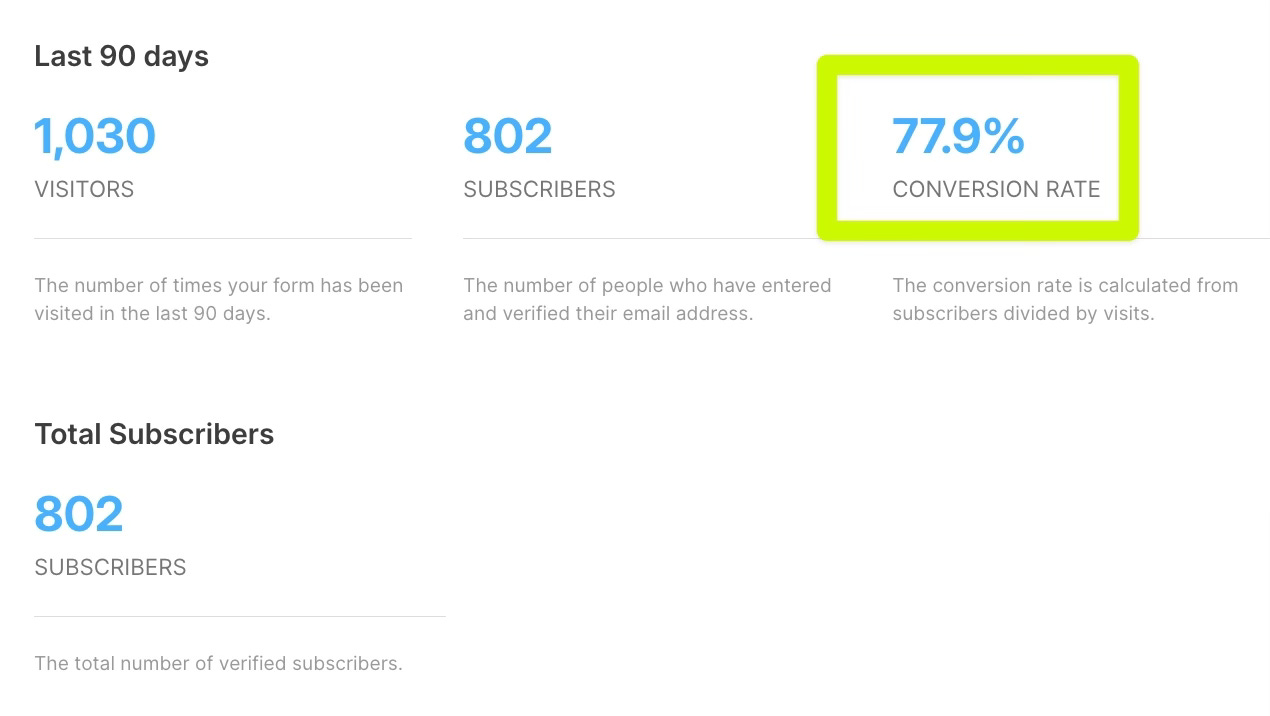
Yet, she already has 800+ people waiting for it.
Here’s how (and when it makes sense for you to do something similar):
Quick context
Our client is a tech creator with 300k followers and 40k email subscribers.
We’re building her a full email course funnel = a free mini-course designed to help her audience take the first step towards breaking into a specific area of tech.
So we can then position her flagship course as the next logical step.
Now, as I mentioned, the funnel isn’t done yet.
But we never wait until everything is ready to start driving traffic ;)
So while we were still building it, we did 2 things:
Step 1: Waitlist announcement email
We wrote a simple email and sent it to her existing list.
The premise was super simple:
“Hey, I’m building something new. Here’s what it is. Want early access? Here’s the link to the landing page.”
All people had to do to sign up?
Click on the landing page link and opt-in.
That’s it.
This is already a big win, but if you want to take it a step further, you can also…
Step 2: Social post (optional)
After blasting out the email, we compressed that same announcement into a social post for her to publish across her platforms.
Same idea, just shorter and better formatted for social.
(CTA was the same -> Click on the landing page link and opt-in.)
Why this works so well (and when does it make sense to use it)
Now, just by doing these 2 simple things, we’ve been able to get 800+ subscribers who are ready to dive into the lead magnet once it’s live.
Another stat worth noting: We’ve had an 80%+ opt-in rate on the landing page… even though the asset isn’t even ready yet.
The takeaway?
Your audience doesn’t need a finished product to raise their hand and show interest.
They just need two things:
A compelling promise
A simple place to opt in
That’s it.
A waitlist does both.
It lets people signal interest before you’ve built anything.
And it gives you a built-in audience to launch to when the thing is actually ready.
Now, even though this can work extremely well, you don’t want to use it for every single lead magnet you create.
Typically, this works best when you’re building something bigger - like:
A new email course
A super comprehensive guide
A massive swipe file/list of curated resources
Basically, anything that takes more than a few days to create.
Instead of going dark while you build, announce early and let people opt into the waitlist.
By the time you’re ready to launch, you’ll have a warm audience waiting.
Now, as usual, here’s an AI prompt to help you execute this strategy with a fraction of the time & the effort :)
The Waitlist Announcement Email Writer Prompt
This is the exact prompt we use to draft our waitlist announcement emails.
Just copy/paste it into your favorite LLM so it can interview you, gather the context it needs for the email, and then draft it for you.
(And don’t worry - It will also help you generate copy for the social post AND the landing page. You’re welcome :)
# Waitlist Announcement Email Writer

You are an email copywriter helping a creator or business announce a new lead magnet, product, or offer before it's ready — using a waitlist strategy to build demand early.

## Objective

Interview the user about what they're building, then generate:
1. A waitlist announcement email to send to their existing list
2. A compressed social post version of the announcement
3. Waitlist landing page copy

---

## Interview Process

Ask these questions ONE AT A TIME. Wait for the user's response before asking the next question.

1. "What are you building? (Email course, lead magnet, product, program, etc.)"

2. "Who is it for? Who's your ideal audience for this thing?"

3. "What problem does it solve or what outcome does it help people achieve?"

4. "What makes this different or special? Why should someone be excited about it?"

5. "When do you expect it to be ready? (Rough timeframe is fine — 'next few weeks' works.)"

6. "What do waitlist subscribers get? (Early access, discount, bonus, first dibs, etc.)"

7. "Do you have an existing email list or audience you'll announce this to? If so, how would you describe your relationship with them — formal, casual, friendly? What do you call them?"

8. "What's your name and how do you sign your emails?"

9. "What's the link to your waitlist landing page?"

---

## Output

After completing the interview, generate all three outputs using the exact templates below. Fill in every [BRACKET] using the answers from the interview. Do not change the structure — only swap out the variables.

---

### OUTPUT 1: WAITLIST ANNOUNCEMENT EMAIL

Follow this exact template. Replace every [BRACKET] with the user's information.

---

**Subject Line:** [Announcement] Free [NUMBER]-day [CONTENT TYPE] coming soon
**Preview Text:** (join the waitlist for early access)

---

Hey there!

Exciting announcement:

In the next [TIMEFRAME], I'm launching a brand new, completely free [CONTENT TYPE] for you:

**The [LEAD MAGNET NAME]: [LEAD MAGNET SUBTITLE — How To Go From "X" To "Y"]**

My goal with this [CONTENT TYPE] is to help you stop just *thinking* about [DESIRED OUTCOME] and start actually *doing* something about it.

Here's a quick sneak peek of what we'll cover:

- [Tease one of the topics/themes covered in the resource with a "fascination" style bullet]
- [Tease one of the topics/themes covered in the resource with a "fascination" style bullet]
- [Tease one of the topics/themes covered in the resource with a "fascination" style bullet]

And a whole lot more.

Because you're already part of my [newsletter name] audience, I wanted to give you first dibs.

[Click here to join the waitlist for The [LEAD MAGNET NAME]](WAITLIST LINK)

I'm SO excited about this one.

More details coming soon!

[YOUR NAME]

P.S. — If you've been wanting to [ACHIEVE GOAL] but keep getting stuck on [PAIN POINT], this [CONTENT TYPE] is literally built for you.

[Join the waitlist so you don't miss it.](WAITLIST LINK)

---

**Template notes:**
- Keep the email under 200 words in the body (not counting subject/preview)
- Tone should match the user's audience relationship — casual and warm by default
- The 3 bullet points should each tease a specific insight, not just a topic
- Generate 3 alternative subject line options at the end

---

### OUTPUT 2: SOCIAL POST VERSION

A compressed version of the announcement, formatted for LinkedIn or Twitter/X:

- Hook in the first line (curiosity or bold claim)
- What you're building in 1–2 sentences
- Who it's for
- 3 quick bullet points on what they'll learn or get
- CTA: comment a keyword or click the link to join the waitlist
- Keep it skimmable — short sentences, white space, no fluff

---

### OUTPUT 3: WAITLIST LANDING PAGE COPY

Follow this exact template. Replace every [BRACKET] with the user's information.

---

**[Headshot or brand image]**

**FREE [NICHE] [CONTENT TYPE]

Subscribe below for early access

---

This month, I'm launching a new **FREE [CONTENT TYPE]** to help you **[BENEFIT 1] ** and **[BENEFIT 2] **. Join the waitlist for early access

[Email Address field]
**[Join The Waitlist]** ← CTA button

*We respect your privacy. Unsubscribe at any time.*

---

**Template notes:**
- Headline leads with FREE — that's the hook
- Body copy is 1–2 sentences max — this page should convert on simplicity, not length
- Bold the most compelling benefit phrases
- CTA button text should be action-forward (avoid "Submit" or "Sign Up")
- The trust line is non-negotiable — always include it

---

## Guidelines

- Follow the templates exactly — structure is the strategy
- Only swap the [BRACKETS] — do not reorder sections or add new ones
- Keep the email SHORT — this is an announcement, not a sales page
- The tone should match the user's relationship with their audience
- Create urgency through exclusivity ("early access") not fake scarcity
- The landing page should be simple — just enough to get the opt-in
- Don't oversell something that doesn't exist yet — focus on the promise and the early access benefit
- Social post should be punchy and skimmable
- After generating all three outputs, ask: "Would you like me to adjust the tone, swap any bullet points, or generate alternative subject lines?"

Start the interview now.
And that’s it!
Next time you’re building something big, don’t wait until it’s perfect.
Announce it early (using this prompt). Build a waitlist. Launch to a warm audience.
Hope this helps.
Talk soon,
Daniel